Photoshop合成正在施法的巫師【英】(5)
文章來源于 photoshoptutorials.ws,感謝作者 MARIA SEMELEVICH 給我們帶來經精彩的文章!Step 74
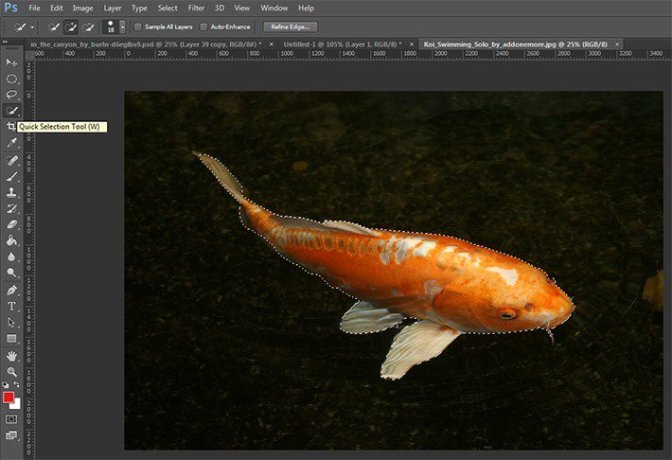
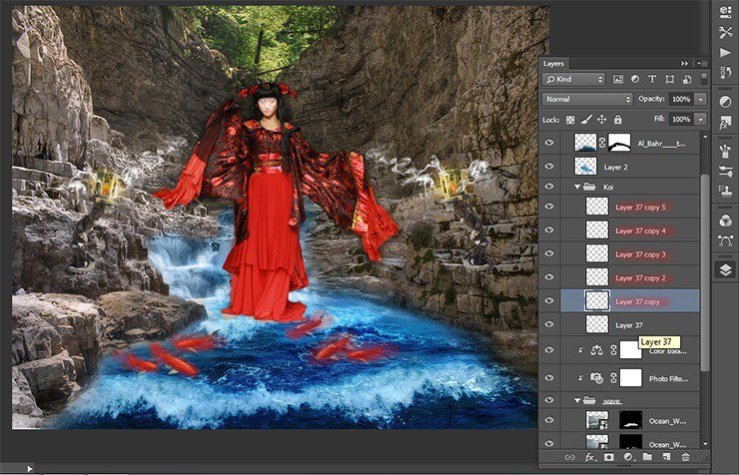
Put gold koi. Go to the tab with the desired fish. Choose a Quick Selection Tool (W). Select all the fish.
Step 75
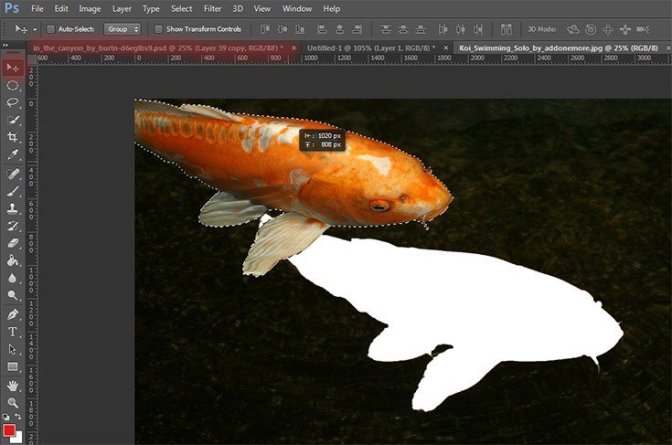
Now take the Move Tool (V). Capture the selection and drag it into the document with work.
Step 76
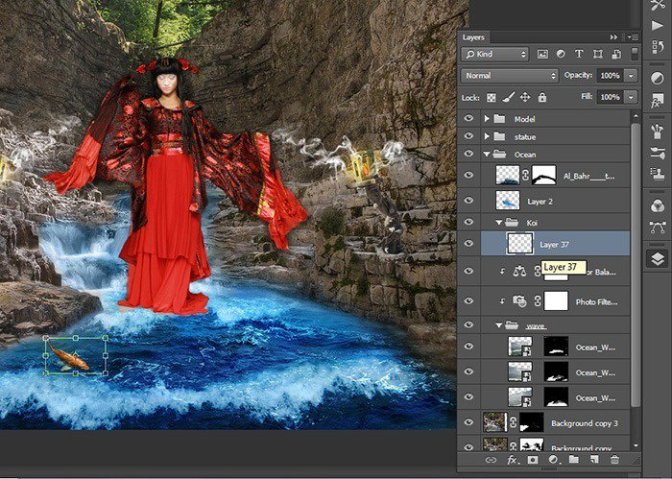
Now change the size of the fish. Ttransform it to the desired size. The short key Ctrl+ T make it small. Try to place the fish in a circle, but observing the randomness.
Step 77
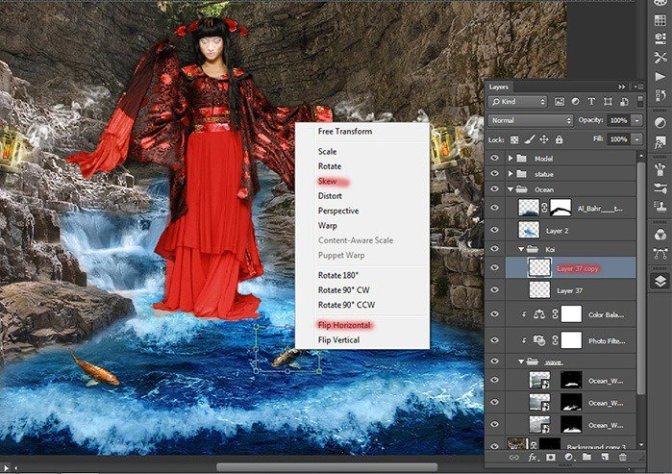
Now I duplicate the fish changed its size and tilted. Ttransform it to the desired size. The short key Ctrl+ T. Right click in any field pattern and in drop-down list, select “Flip Horizontal”. To tilt in the same list, select “Skew”.
Step 78
Duplicate 4 times. Change the fish want to you want or as shown in Figure. Placed them so. Remember this is a creative process and show how I did it. Not necessarily as I do.
Step 79
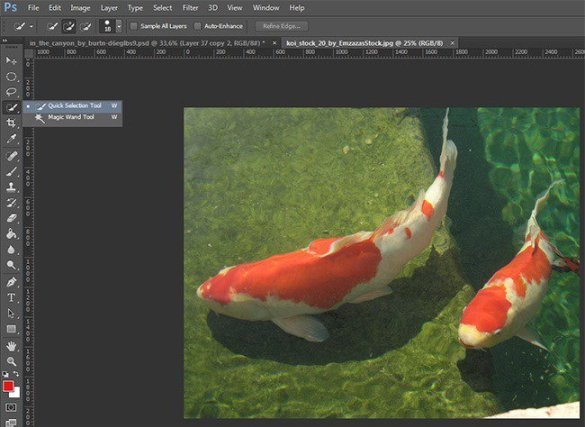
Let’s add some other fish. Go to tab with open red and white fish. Choose a Quick Selection Tool (W). Select fishes.
Step 80
Now take the Move Tool (V). Capture the selection and drag it into the document with work.

Step 81
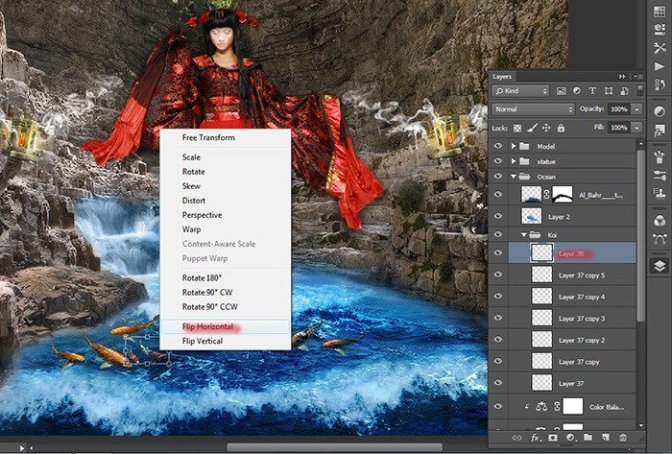
Now I duplicate the fish changed its size. Ttransform it to the desired size. The short key Ctrl+ T. Right click in any field pattern and in drop-down list, select “Flip Horizontal”.
Step 82
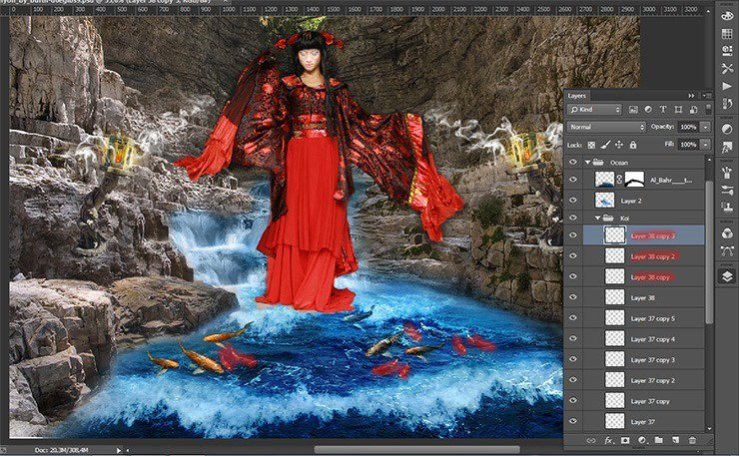
Duplicate 3 times. Change the fish want to you want or as shown in Figure.
Step 83
It remains to add 2 more fish :) Repeat all have done with the last fish. I duplicate it once. Placed as shown in the figure.

Step 84
Now I want to add shadows to the belly of fish and make them a little brighter. To do this, add two adjustment layers.

Step 85
The first layer is the Color Balance.
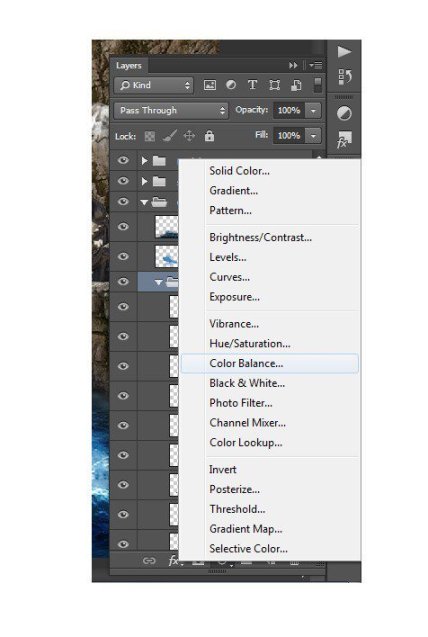
Step 86
In the window that appears, for midtones and highlights, set the settings as shown in the figure. Tone can change by clicking on the “tone”. Be sure to apply to a group of adjustment layer.
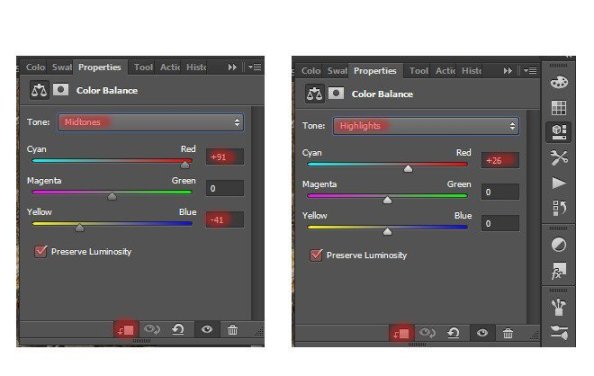
Step 87
Next adjustment layer is Hue/Saturation…
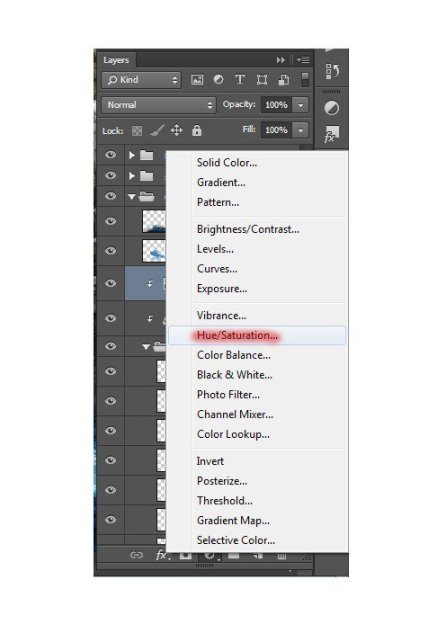
Step 88
Set the settings as shown in the figure.
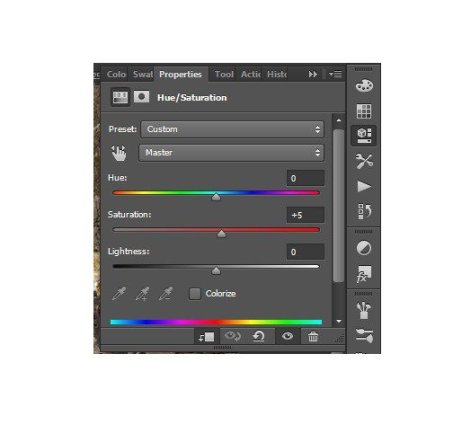
Step 89
Our work with a fish is complete! Here is the result.

Step 90
I really wanted to add the magic, so I used the space. Begin to create space landscape. Go to File> Place and select file with two yellow planet.
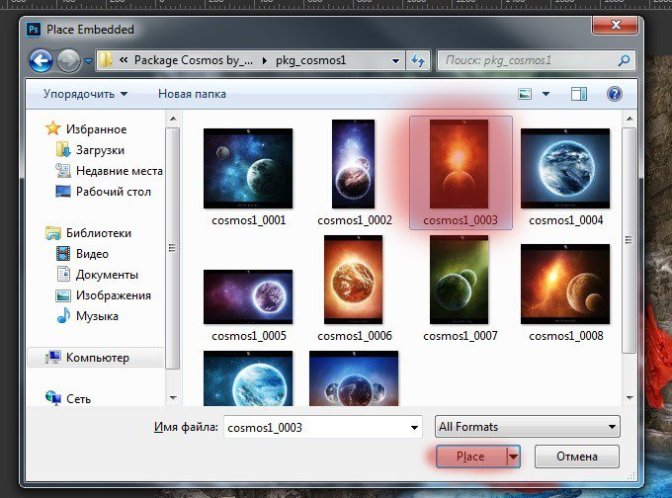
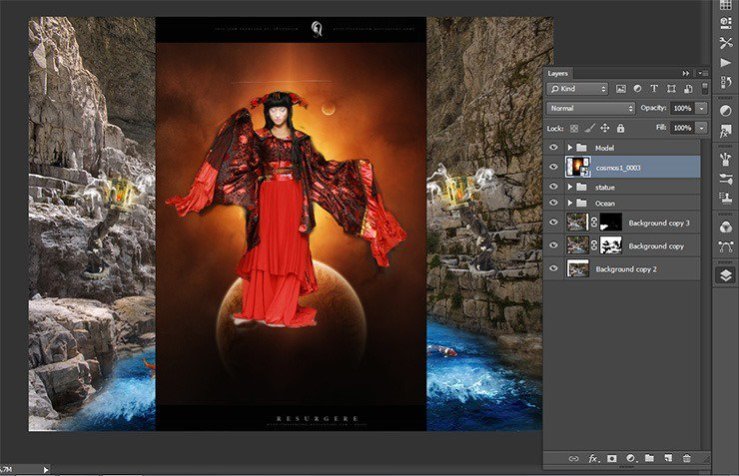
Step 91
Select the with planets and click on folder icon in Layer panel to add in group the short key Ctrl+ G. Name it “Galaxy” Space group must be a under group with the model.
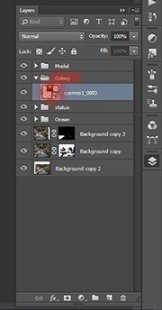
Step 92
Transform the planets (the short key Ctrl+ T). Reduce their size so that they are slightly larger than the model and move them behind model head as shown in the figure.
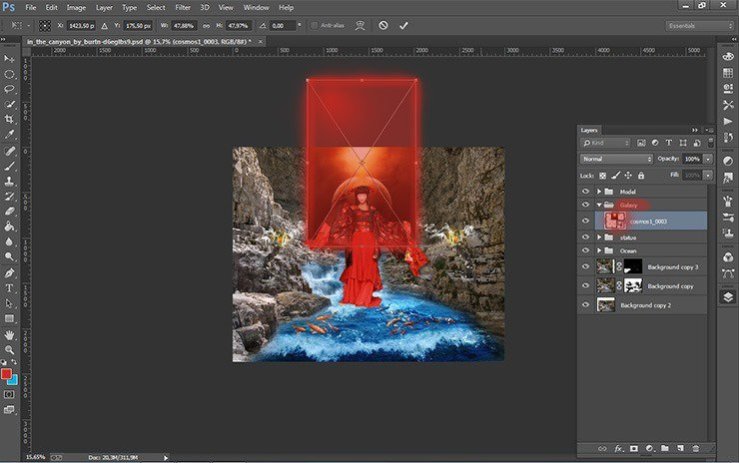
Step 93
Add a layer mask picture with planets and take the Brush Tool (B) on the toolbar.
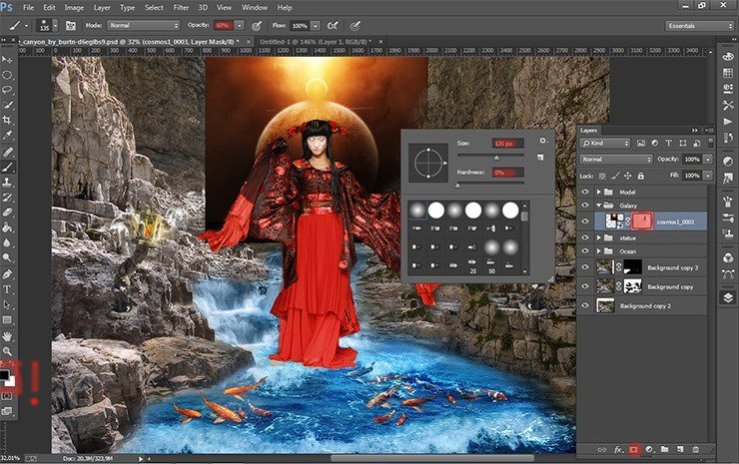
Step 94
Remove some of the dark using a Brush Tool (B) Size: 135px, Hardness: 0% Opacity: 60% Flow: 100%. Do not forget to set black color as your foreground color.
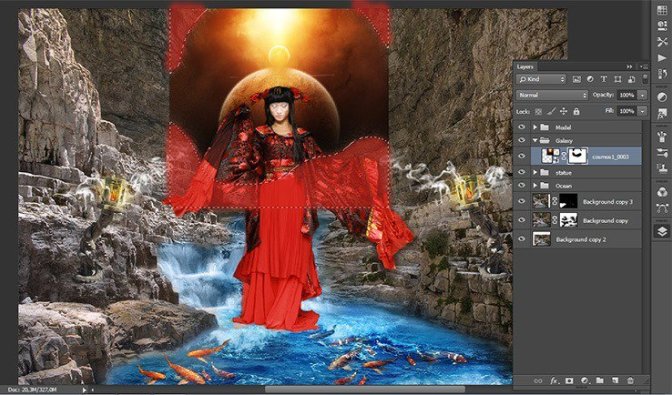
Step 95
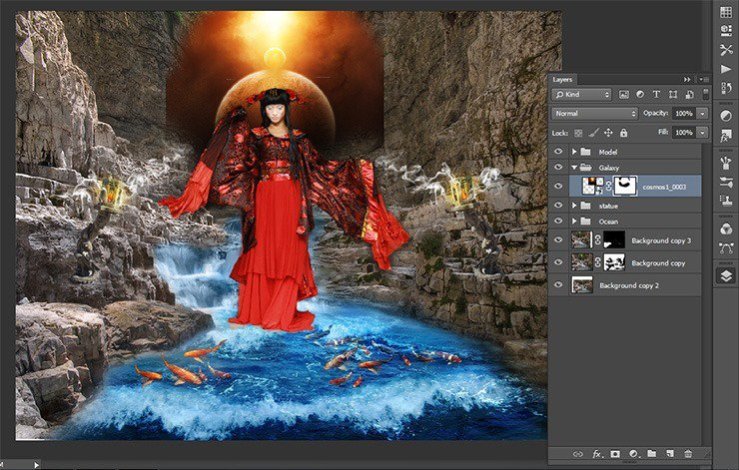
Here’s how should get.
 情非得已
情非得已
-
 Photoshop制作復古風格的老照片效果【英】2018-04-23
-
 Photoshop合成長著創意大樹的長頸鹿【英】2018-04-23
-
 Photoshop合成冰凍特效的金魚場景【英】2018-02-10
-
 Photoshop合成夢幻風格的森林場景【英】2018-02-10
-
 Photoshop合成正在施法的巫師【英】2018-02-10
-
 Photoshop制作金屬質感的3D立體字【英】2018-01-09
-
 Photoshop設計火焰燃燒藝術字教程【英】2018-01-09
-
Photoshop制作復古風格的老照片效果【英】
相關文章11882018-04-23
-
Photoshop合成長著創意大樹的長頸鹿【英】
相關文章13832018-04-23
-
Photoshop合成冰凍特效的金魚場景【英】
相關文章34052018-02-10
-
 Photoshop制作黃金質感立體字【英】
相關文章7422018-02-10
Photoshop制作黃金質感立體字【英】
相關文章7422018-02-10
-
 Photoshop制作驚艷大氣的3D立體字
相關文章14682018-02-10
Photoshop制作驚艷大氣的3D立體字
相關文章14682018-02-10
-
Photoshop合成夢幻風格的森林場景【英】
相關文章24492018-02-10
-
 Photoshop制作復古雙重曝光字體
相關文章6532018-01-09
Photoshop制作復古雙重曝光字體
相關文章6532018-01-09
-
 Photoshop制作木地板LOGO刻印效果【英】
相關文章19272018-01-09
Photoshop制作木地板LOGO刻印效果【英】
相關文章19272018-01-09