Photoshop制作毛茸茸的圣誕節(jié)字體【英】(3)
文章來源于 Tutsplus.com,感謝作者 Rose 給我們帶來經(jīng)精彩的文章!設(shè)計教程/國外教程/國外教程2017-12-16
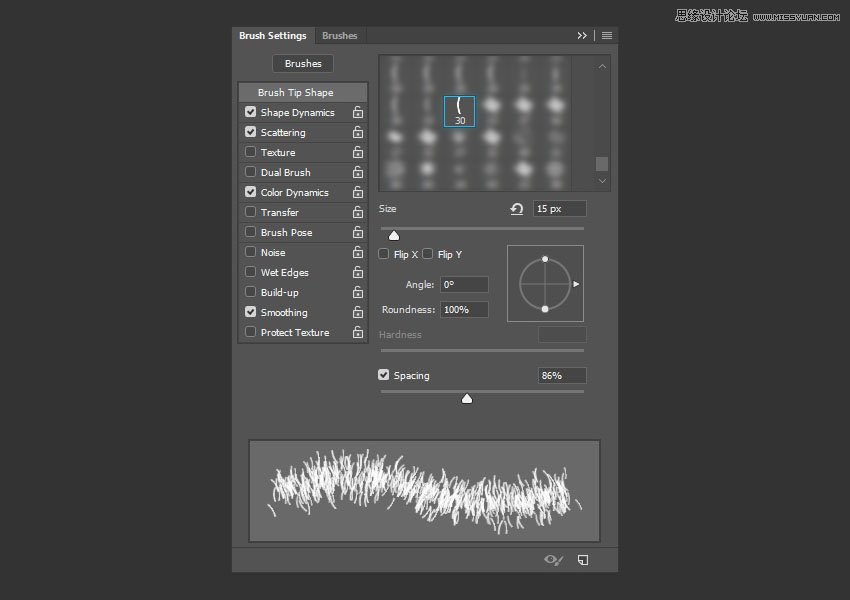
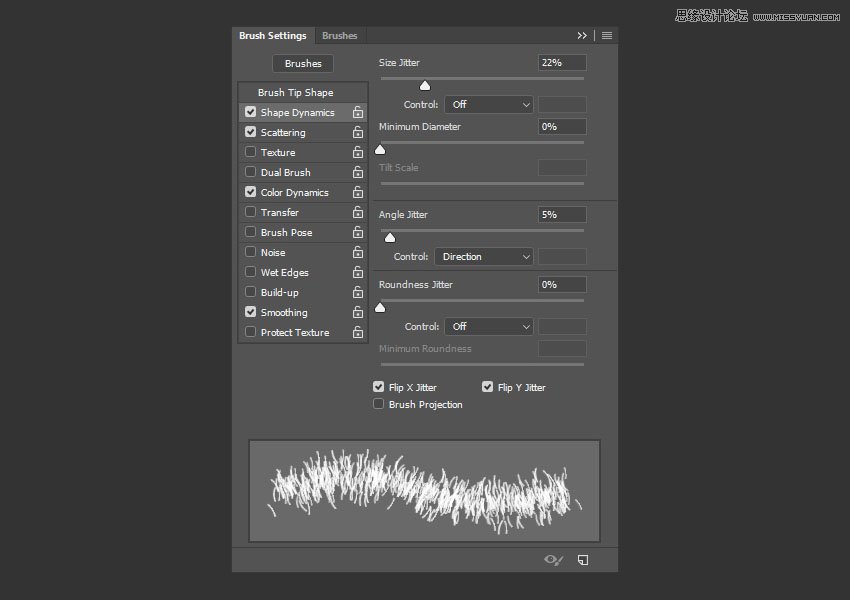
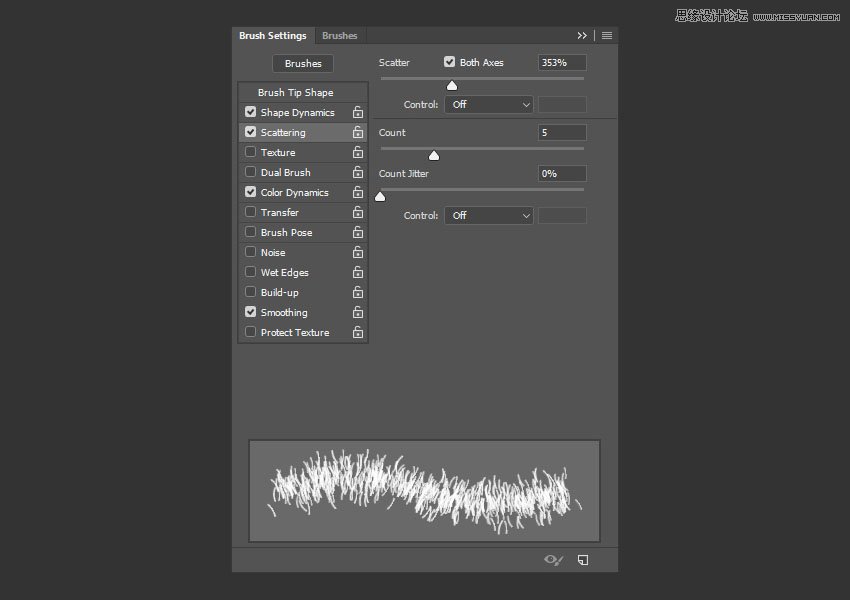
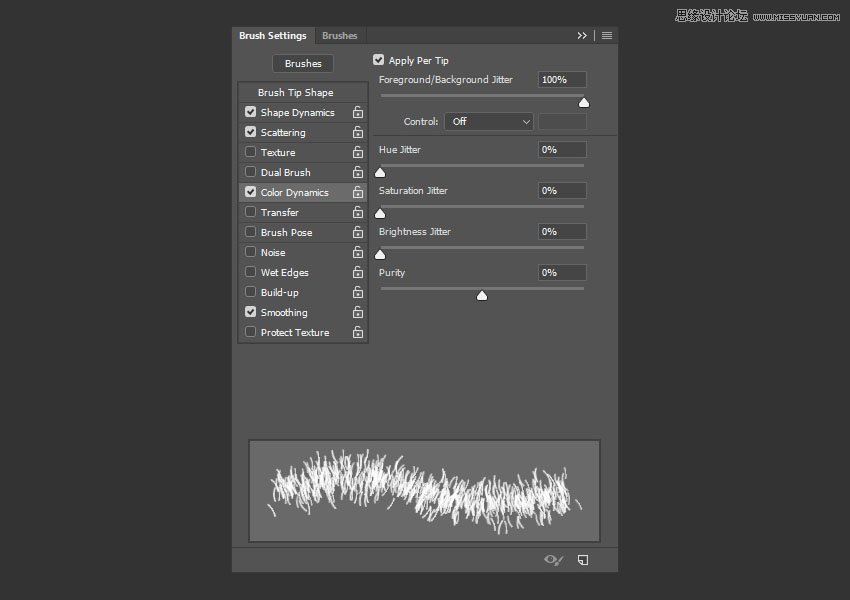
Step 3 Modify the same tip's settings to create another variation: Brush Tip Shape Shape Dynamics Scattering Color Dynamics Step 4 Click the Create new brush icon, and change the Name to Brush 02. St
Step 3
Modify the same tip's settings to create another variation:
Brush Tip Shape
Shape Dynamics
Scattering
Color Dynamics
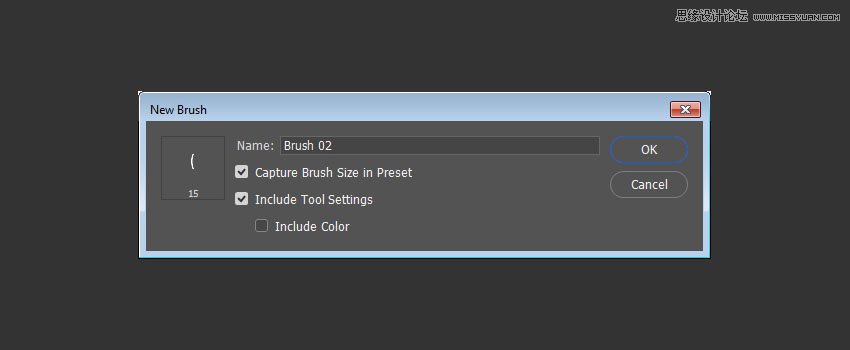
Step 4
Click the Create new brush icon, and change the Name to Brush 02.
Step 5
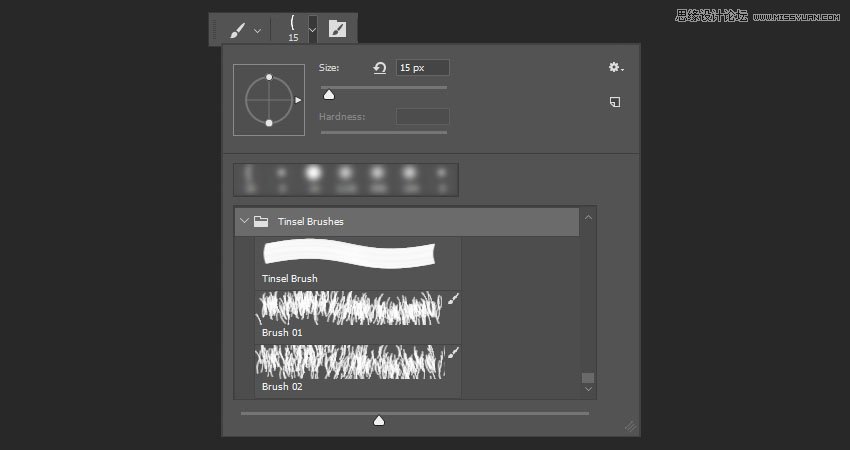
This is optional, but it's a cool new feature in Photoshop that will help keep things a bit more organized.
Click the Brush Preset Picker icon in the Options bar, Command-click the icons of the three brush tips you've created for this tutorial (Tinsel Brush, Brush 01, and Brush 02), click the flyout menu icon, and choose New Brush Group.
Name the group Tinsel Brushes, and click OK.
 愛你不要你
愛你不要你
推薦文章
-
 Photoshop制作復(fù)古風(fēng)格的老照片效果【英】2018-04-23
-
 Photoshop合成長著創(chuàng)意大樹的長頸鹿【英】2018-04-23
-
 Photoshop合成冰凍特效的金魚場景【英】2018-02-10
-
 Photoshop合成夢幻風(fēng)格的森林場景【英】2018-02-10
-
 Photoshop合成正在施法的巫師【英】2018-02-10
-
 Photoshop制作金屬質(zhì)感的3D立體字【英】2018-01-09
-
 Photoshop設(shè)計火焰燃燒藝術(shù)字教程【英】2018-01-09
熱門文章
-
Photoshop制作復(fù)古風(fēng)格的老照片效果【英】
相關(guān)文章11882018-04-23
-
 Photoshop制作黃金質(zhì)感立體字【英】
相關(guān)文章7422018-02-10
Photoshop制作黃金質(zhì)感立體字【英】
相關(guān)文章7422018-02-10
-
 Photoshop制作驚艷大氣的3D立體字
相關(guān)文章14682018-02-10
Photoshop制作驚艷大氣的3D立體字
相關(guān)文章14682018-02-10
-
 Photoshop制作復(fù)古雙重曝光字體
相關(guān)文章6532018-01-09
Photoshop制作復(fù)古雙重曝光字體
相關(guān)文章6532018-01-09
-
 Photoshop制作木地板LOGO刻印效果【英】
相關(guān)文章19272018-01-09
Photoshop制作木地板LOGO刻印效果【英】
相關(guān)文章19272018-01-09
-
Photoshop制作金屬質(zhì)感的3D立體字【英】
相關(guān)文章4612018-01-09
-
Photoshop設(shè)計火焰燃燒藝術(shù)字教程【英】
相關(guān)文章7612018-01-09
-
 Photoshop制作復(fù)古花朵組成的藝術(shù)字【英】
相關(guān)文章3802018-01-09
Photoshop制作復(fù)古花朵組成的藝術(shù)字【英】
相關(guān)文章3802018-01-09